Of all the model-by-model comparisons people search for, this one comes up the most. OpenAI’s ChatGPT and Anthropic’s Claude are the two most popular AI assistants available right now. Both can write, analyze, code, and answer questions, but they approach these tasks differently.
You will find side-by-side specs, honest assessments of strengths and weaknesses, and a clear decision framework at the end. The goal is not to declare a winner. It is to help you pick the right tool for your specific work.
The specs and comparisons here reflect October 2026 versions, including ChatGPT’s GPT-6 and GPT-5.6 models and Claude’s Opus 5.5 and Fable 5.1.
Quick Comparison
This table covers the headline differences. Each section below goes deeper.
| Feature | ChatGPT (GPT-6 Astra) | Claude (Opus 5.5) |
|---|---|---|
| Provider | OpenAI | Anthropic |
| Context window | 1,050,000 tokens | 1,000,000 tokens |
| Max output | 128,000 tokens | 128,000 tokens |
| API input cost | $10.00 / 1M tokens (GPT-6.1 Sol: $2.00) | $4.00 / 1M tokens (Fable 5.1: $10.00) |
| API output cost | $50.00 / 1M tokens (GPT-6.1 Sol: $10.00) | $20.00 / 1M tokens (Fable 5.1: $50.00) |
| Free tier | Yes (GPT-6 Luna) | Yes (Sonnet + Haiku) |
| Paid plan | $20/mo (Plus) | $17-20/mo (Pro) |
| Best for | Versatile all-in-one use: images, apps, everyday tasks | Careful coding, natural writing, long documents |
| API inputs | Text, image | Text, image, PDF |
Both models accept images and produce text through the API. Both apps offer voice, and ChatGPT adds built-in image generation. Claude’s paid plans give its top models the full 1M token context window in chat.
ChatGPT vs Claude Tested: Real Output Comparisons
Comparison tables show specs. They do not show how the models actually feel to use.
We have run the same two prompts twice. The September 27, 2026 run used GPT-5.6 Sol and Claude Opus 5.5. The earlier run, on February 28 and March 1, 2026, used GPT-5.2 and Claude Opus 4.6, and appears below each September result.
The coding test at the end of this section ran once, in September. For a larger comparison scored blind, see our LLM writing quality test: eight writing tasks, every answer and score published.
Reasoning Test
We asked both models to assess a real business dilemma: a 15-person software company offered an acquisition at 3x annual revenue, with the two founders disagreeing on whether to sell. The prompt specifically asked for an honest assessment, not a generic pros-and-cons list.
The prompt: “A small software company (15 employees) has been offered an acquisition by a larger competitor for 3x annual revenue. The founders are split — one wants to sell, the other wants to keep growing independently. What should they consider? Give me your honest assessment, not a generic pros/cons list.”
September 27, 2026 run
ChatGPT (GPT-5.6 Sol)
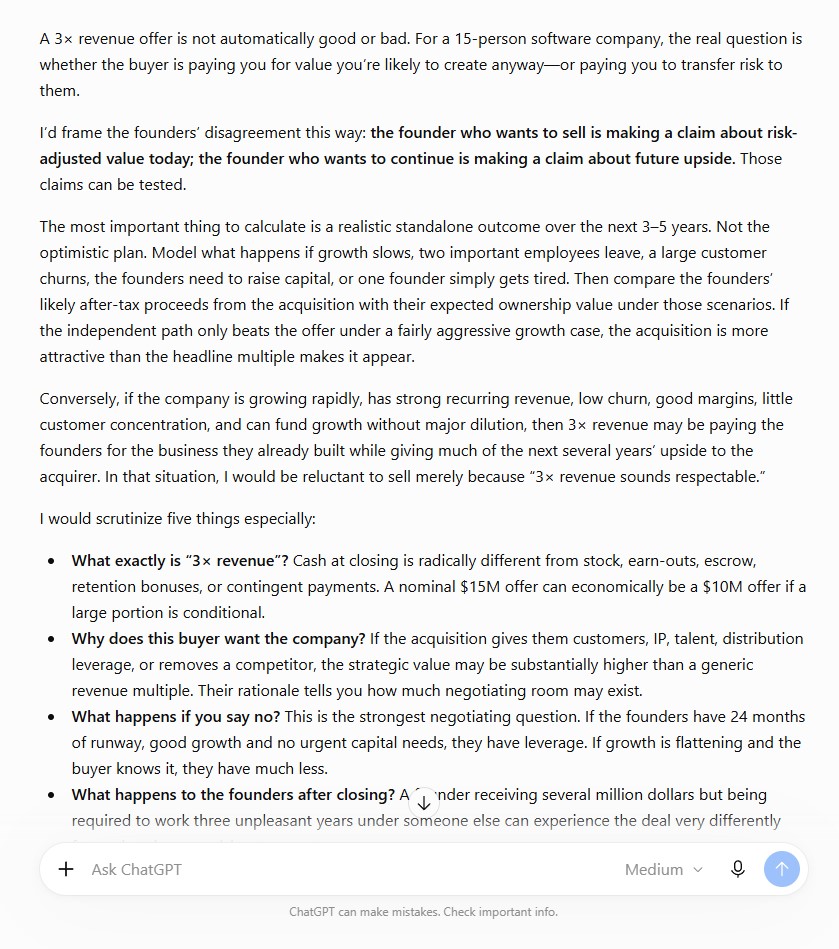
ChatGPT opened in prose, reframing the split as two testable claims: risk-adjusted value today against future upside. It told the founders to model a realistic three-to-five-year standalone outcome, including slower growth and key departures.
A five-point list follows, covering deal structure, the buyer’s motive, the cost of saying no, life after closing and whether the dispute is about money. It ends with a clear position: don’t accept immediately, but take the offer seriously. View the full ChatGPT response.
Claude (Opus 5.5)
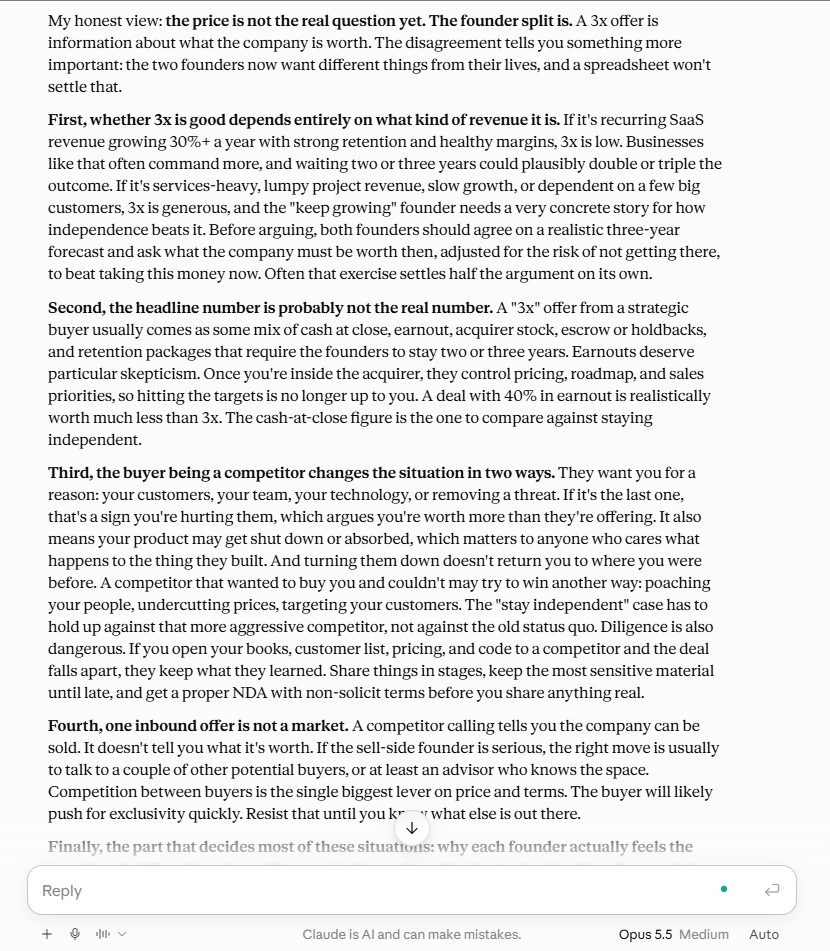
Claude opened with a verdict: the price is not the real question yet, the founder split is. It then worked through five bolded points, from revenue quality and earn-outs to the risk of opening your books to a competitor.
It ranged wider than ChatGPT, adding the case for finding other buyers and a warning about deadlock in the shareholder agreement. It closed with three middle-ground options, including one founder buying the other out. View the full Claude response.
Both models gave substantive answers in both runs, but September narrowed the gap. Both models mixed prose with a list, named the founder split as the real issue, and advised against accepting the offer as it stands.
Claude covered more ground, and in both runs it raised one founder buying the other out. ChatGPT closed with the crisper decision test. The earlier run below shows a wider split: ChatGPT structured for clarity, Claude reasoned through narrative.
February 28, 2026 run
ChatGPT (GPT-5.2)
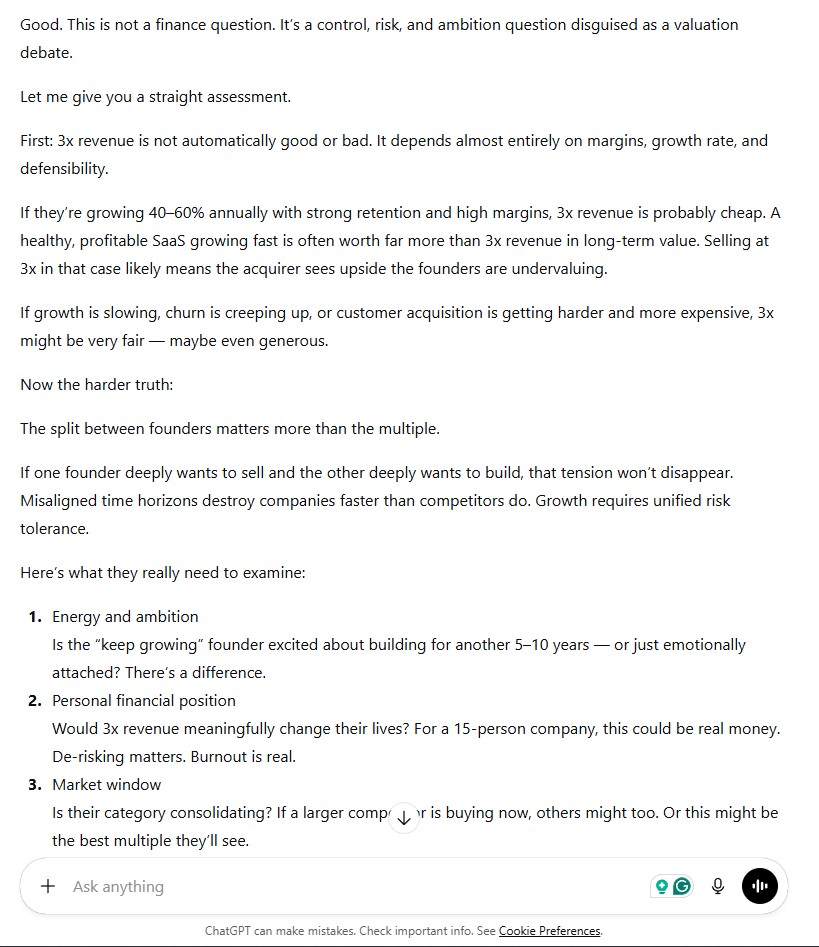
ChatGPT reframed the question as one of control, risk, and ambition, then built a five-point numbered framework covering energy, financial position, market window, concentration risk, and post-acquisition reality. The analysis is sharp and each point is well-reasoned.
But the numbered list was exactly what the prompt asked it to avoid. In this run, ChatGPT fell back on a structured framework despite the instruction. That is a strength if you want scannable output and a limitation if you want someone to think with you rather than organize for you. View the full ChatGPT response.
Claude (Opus 4.6)
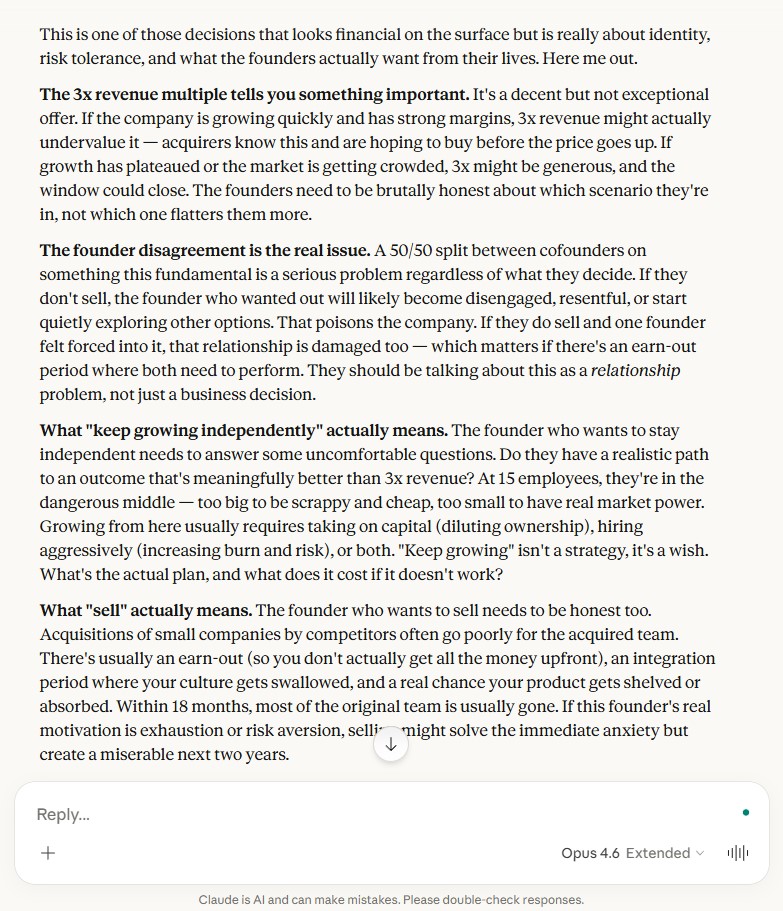
Claude opened by reframing the decision as one about identity rather than money. No numbered list. It works through the 3x multiple, the founder disagreement, and the reality of both options as connected arguments rather than separate categories. It names the founder split as a relationship problem, not just a business one, and raises a path most people overlook: one founder buying the other out.
The analysis reads less like a framework and more like advice from someone who has thought about this specific situation before. View the full Claude response.
Writing Style Test
The prompt asked both models to explain why people underestimate creative project timelines, written as if talking to a smart friend over coffee. Not a blog post, not an article, just a natural explanation. About 150 words.
The prompt: “Explain why most people underestimate how long creative projects take. Write this as if you’re explaining it to a smart friend over coffee — not as a blog post, not as an article, just a natural explanation. About 150 words.”
September 27, 2026 run
ChatGPT (GPT-5.6 Sol)
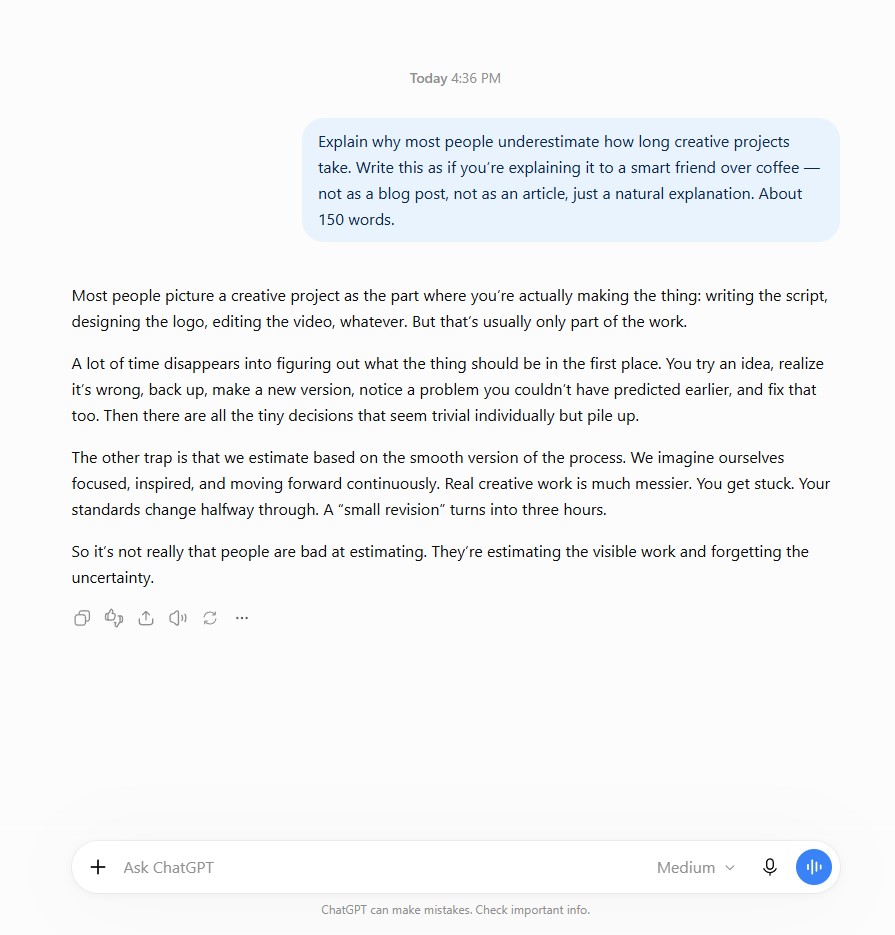
ChatGPT’s September draft is casual in texture. It uses short fragments like “You get stuck.” and throwaway asides like “whatever”.
The shape underneath is still an essay, though. It opens with a thesis, moves through two points and closes on a neat summary: “estimating the visible work and forgetting the uncertainty.” View the full ChatGPT response.
Claude (Opus 5.5)
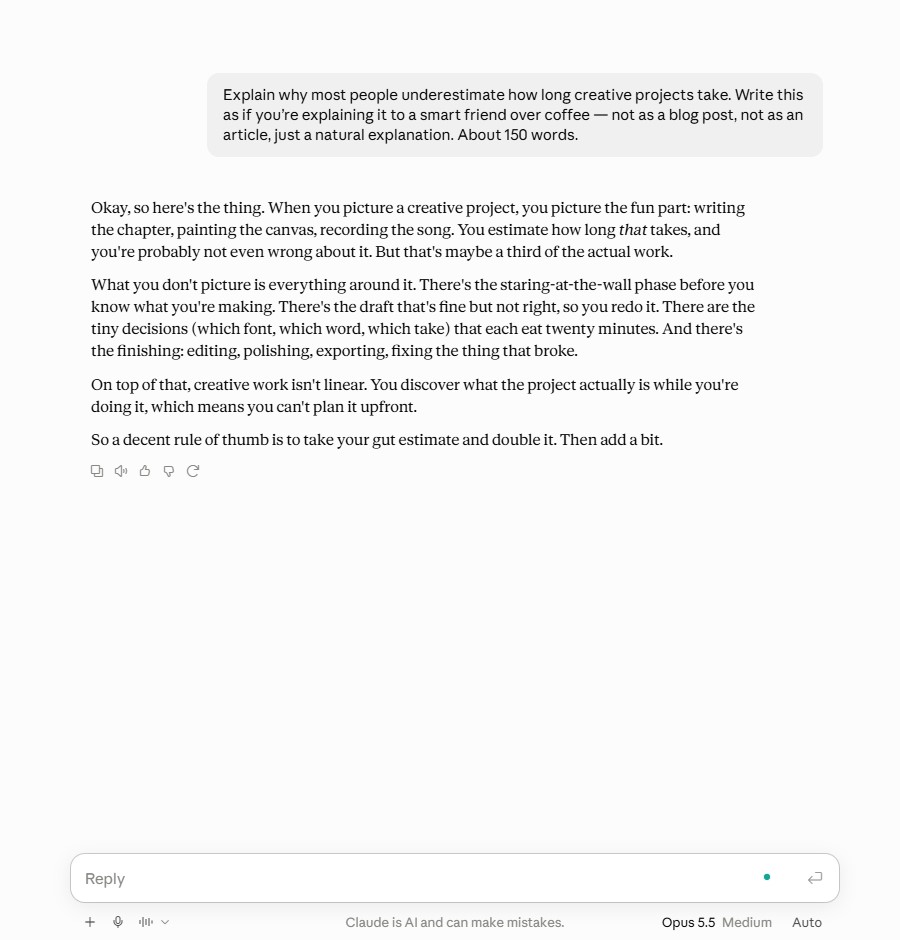
Claude opened with “Okay, so here’s the thing,” almost the line it used in the earlier run. It talks to the reader, tucks asides into parentheses, and ends on a rule of thumb: double your gut estimate, “then add a bit.” View the full Claude response.
Claude produced the more natural draft in both runs. Both times, ChatGPT kept the shape of an essay, with a thesis up front and a summary to close. It even ended both drafts on the same idea: people are not bad at estimating.
Across both runs, the test backs up the Writing Quality section below. ChatGPT leans toward structured content even when asked not to, while Claude adapts to the requested voice more naturally.
March 1, 2026 run
ChatGPT (GPT-5.2)
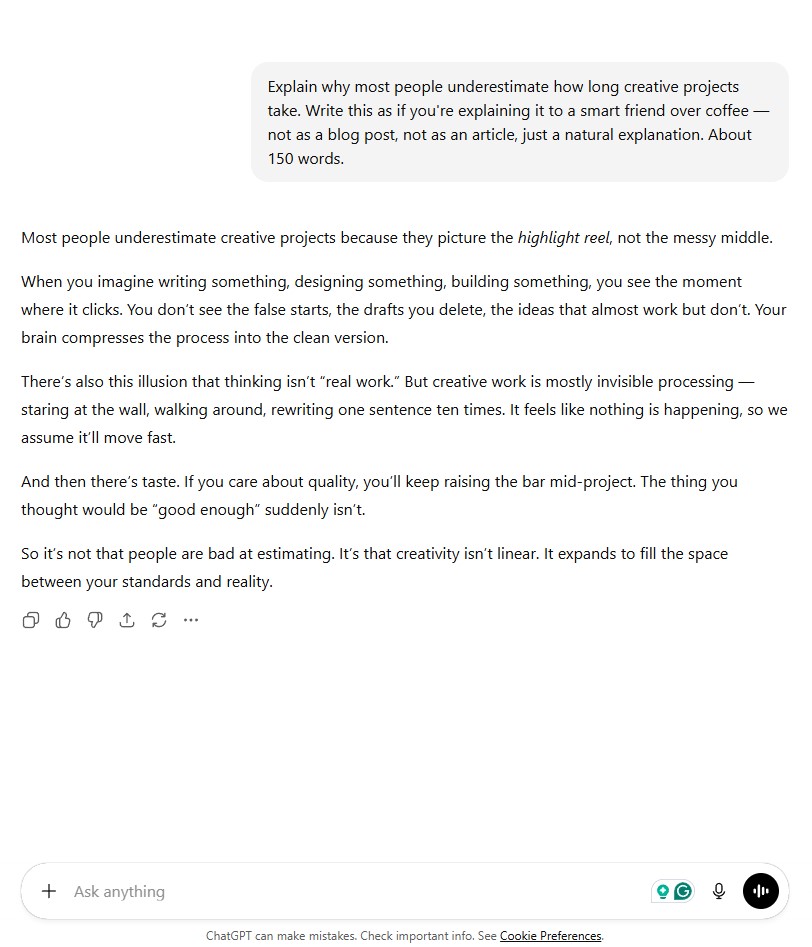
ChatGPT produced a clear, well-organized explanation with a thesis in the opening sentence and distinct supporting points in each paragraph. The writing is strong. But read it again and notice the structure: topic sentence, elaboration, transition, topic sentence, elaboration, conclusion.
That is a blog post format, which is exactly what the prompt said not to write. ChatGPT struggled to fully escape its default content style even when explicitly told to. View the full ChatGPT response.
Claude (Opus 4.6)
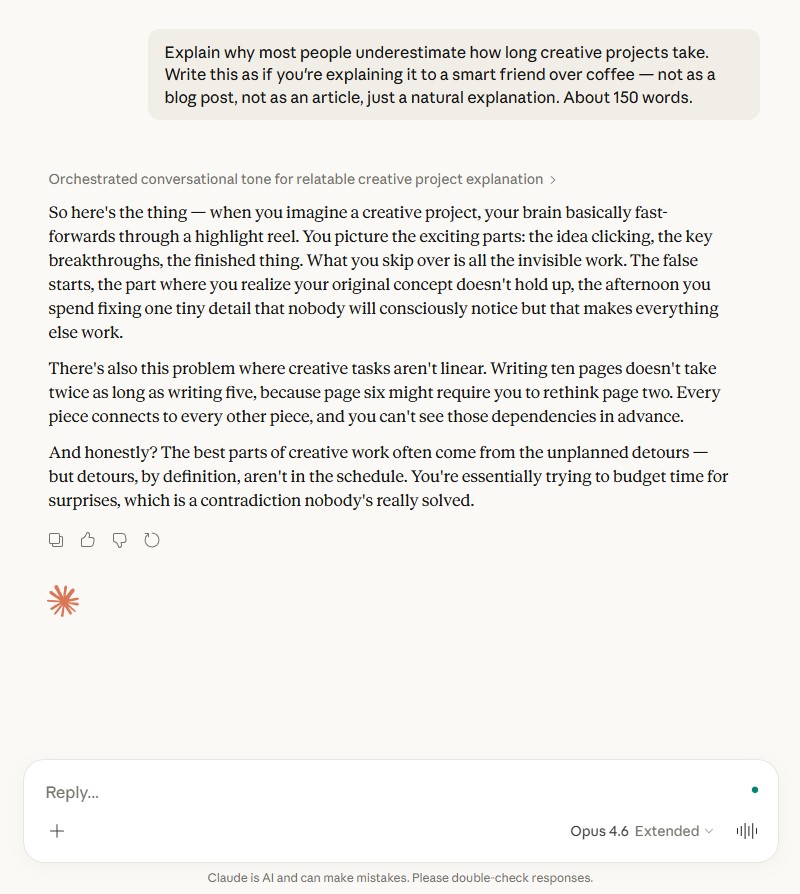
Claude opened with “So here’s the thing —” and stayed in conversational mode throughout. The sentences vary in length and rhythm. It uses dashes and asides the way people actually talk.
The closing line lands like someone wrapping up a thought, not concluding an essay. This is the output that sounds least like AI wrote it.
It is a good example of what we mean when we say Claude writes like a knowledgeable colleague. View the full Claude response.
Coding Test
We also gave both models three small coding tasks on September 27, 2026, the kind a beginner might try. We used the same models as above, GPT-5.6 Sol and Claude Opus 5.5, in their apps. We judged every result by running it in a browser, and read the code only to check comments and explanations.
This covers coding in a chat window only. It does not test agentic tools like Claude Code or Codex working on real projects.
Task 1: Build a Tip Calculator
The prompt: “Create a tip calculator as a single HTML file I can save and open in my browser. It needs: a field for the bill amount; buttons for 10%, 15% and 20% tip; a field for a custom tip percentage; a field for how many people are splitting the bill. It should show the tip amount, the total, and the amount each person pays. It should look clean on a phone screen. Don’t use any external libraries or links.”
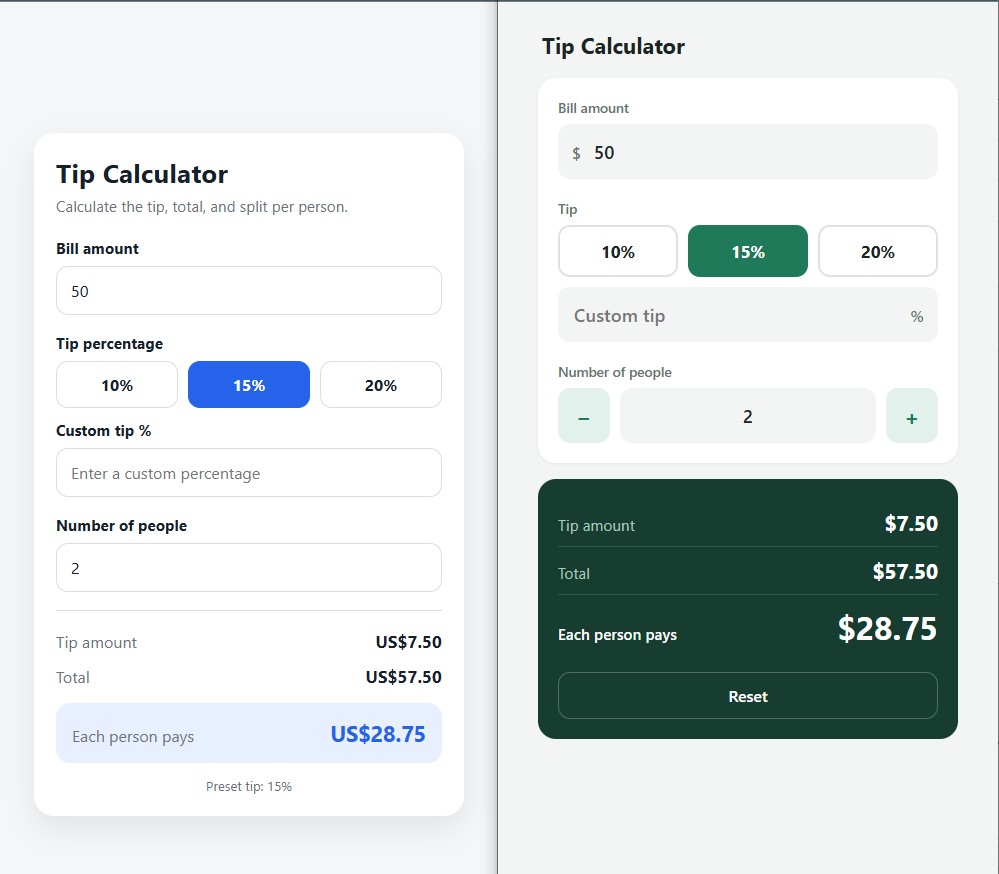
Both calculators worked the first time and gave correct results in every case we tried, including a three-way split of $110 to $36.67. Neither broke on an empty field or at phone width.
Claude went further than the prompt asked. It added a Reset button, $ and % markers inside the fields, and large minus and plus buttons for the number of people. Given a negative bill, both showed $0.00, but only Claude outlined the field in red.
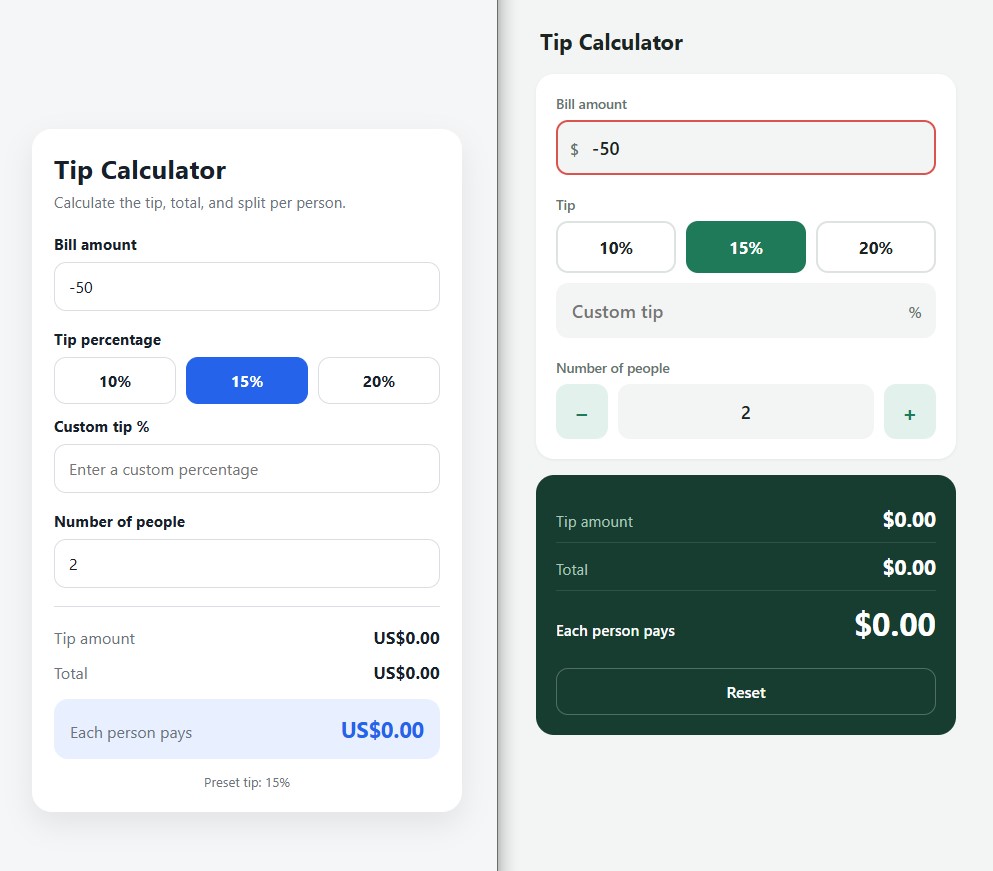
Try ChatGPT’s calculator and Claude’s calculator yourself.
Task 2: Add Dark Mode
The prompt: “Add a button that switches between light and dark mode. Keep everything else working.”
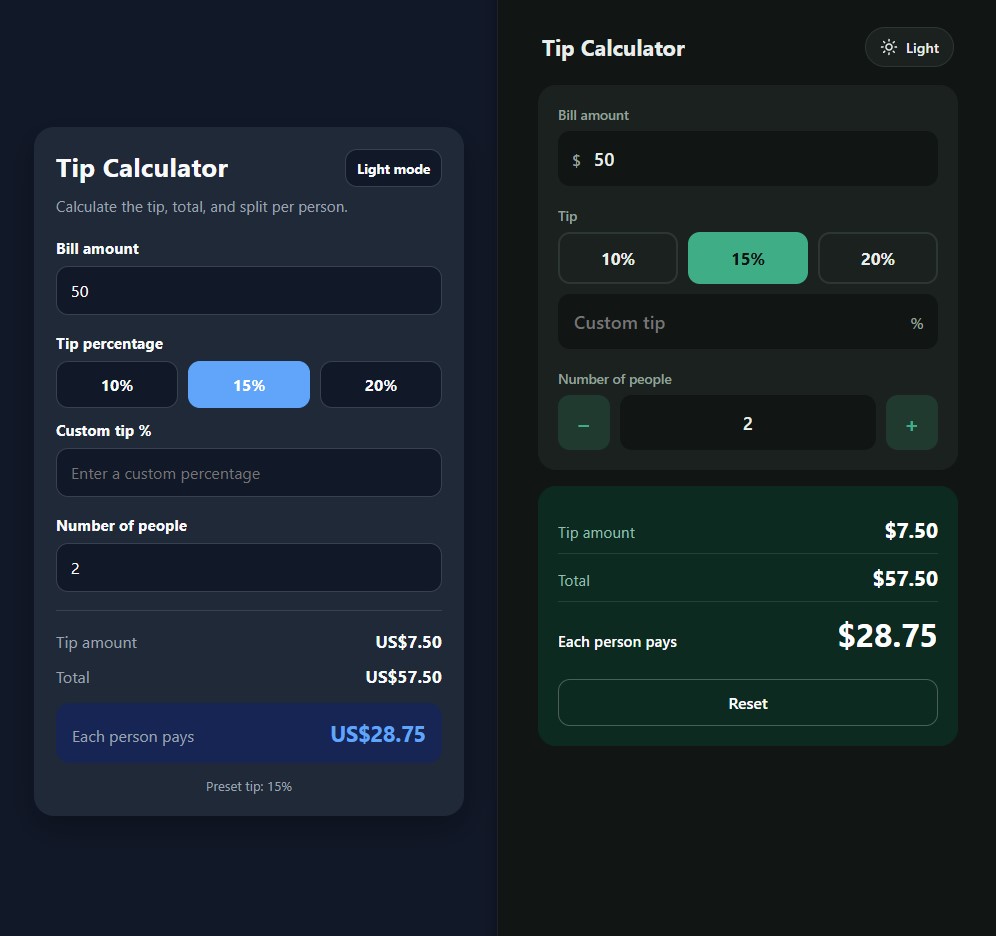
Both toggles worked both ways, and every number stayed correct. Claude’s version also remembers your choice after a reload and follows your device’s own dark-mode setting. ChatGPT’s returns to light mode every time the page reloads.
Try the dark-mode versions from ChatGPT and Claude, or read the full ChatGPT chat and Claude chat for both tasks.
Task 3: Fix a Broken Order Total
We wrote a short page with one obvious bug and one hidden one. It should add three prices to $14.00, but it showed $04.108.201.70. We pasted its code under this prompt:
The prompt: “This page should add up the three prices and show the total. When I click ‘Calculate total’ it shows ‘Total: $04.108.201.70’ instead of the right amount. Find what’s wrong, fix it, and explain in plain English what the problem was. Give me the full corrected file.”
Both models fixed both problems, and both pages showed $14.00. Claude’s explanation was clearer for a non-coder, and it was the only one to explain the hidden rounding issue.
Claude also made the page skip an empty price box, which the prompt never asked for. Leave one box empty, and ChatGPT’s version shows “$NaN” while Claude’s still adds up the rest.
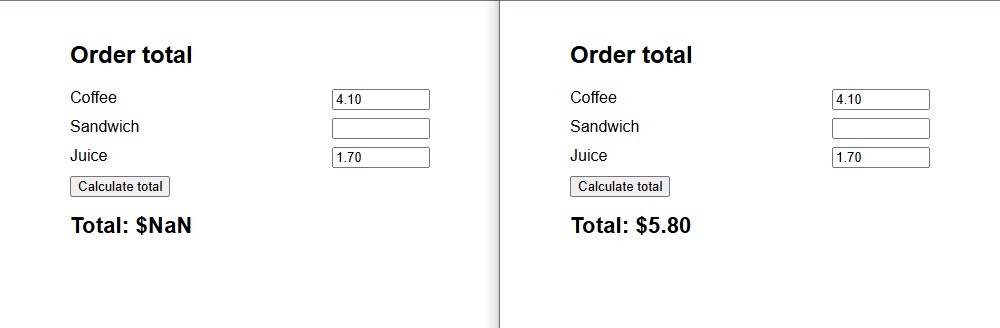
Try ChatGPT’s fix and Claude’s fix, or read the full ChatGPT chat and Claude chat.
Both models produced working code for all three tasks, so on correctness this test is a tie. The difference is approach: ChatGPT did exactly what was asked, while Claude anticipated problems the prompt never mentioned.
For beginners and vibe coders, who describe what they want and rarely read the code, that difference favors Claude. It caught gaps you would not know to ask about, explained its fixes in plain English, and produced the design we preferred. Developers who review every line may still prefer ChatGPT’s smaller, predictable changes.
ChatGPT Overview
ChatGPT runs on OpenAI’s GPT-6 and GPT-5.6 models. The flagship GPT-6 Astra, released in September 2026, handles the hardest reasoning, coding and research work. Below it, Chat runs GPT-6 Sol on paid plans and GPT-6 Luna on Free and Go, while Work, Codex and the API add GPT-6.1 Sol.
OpenAI has built ChatGPT into a broad ecosystem. It includes ChatGPT Images 2.5 for image generation, voice conversations, web search and custom GPTs. The desktop app combines Chat, Work for research and finished deliverables, and Codex for software development.
ChatGPT’s free tier runs GPT-6 Luna with usage limits. An $8/month Go tier (may include ads) adds more messages and longer memory.
The $20/month Plus plan runs GPT-6 Sol in chat and adds GPT-6 Astra, GPT-6.1 Sol, GPT-6 Sol and GPT-6 Luna in ChatGPT Work and Codex. Pro starts at $100/month, with $200 and $500 tiers above it and a Pro reasoning option powered by GPT-6 Astra.
OpenAI describes GPT-6 Astra as its most capable model, built for complex reasoning, coding, computer use and research. It is the model behind the hardest end-to-end work in ChatGPT and Codex.
Claude Overview
Claude is built by Anthropic, a company focused on AI safety research. Claude Opus 5.5, released in September 2026, is Anthropic’s recommended default, with Claude Fable 5.1 above it for the most demanding reasoning. Both carry a 1 million token context window at standard pricing, enough for entire books or large codebases.
Claude’s design prioritizes careful, accurate responses. It tends to acknowledge uncertainty rather than guess, which makes it popular for research and analysis tasks.
Anthropic’s approach to safety training gives Claude a distinct personality, one that many users describe as thoughtful and direct. The free tier provides limited Sonnet and Haiku access.
Claude Pro at $17/month (annual) or $20/month (monthly) adds Opus, with Fable 5.1 through usage credits. Max plans start at $100/month for much more usage, and Claude Code provides a coding agent.
Writing Quality
Writing is one of the most common reasons people use AI assistants. Both ChatGPT and Claude produce competent text, but their styles differ noticeably.
In our blind writing test in October 2026, Claude scored 4.8 out of 5 and ChatGPT 4.6 across eight tasks, from blog intros to landing pages. Head to head, Claude won five tasks and ChatGPT won the board summary. The story opening and the DNS explanation were ties.
ChatGPT reached 96% of Claude’s score at about a quarter of the API cost. Every answer and score is in our LLM writing quality test.
ChatGPT tends to produce structured, organized writing, even when asked for something looser. In both runs of our coffee-chat test, it kept an essay’s thesis-and-summary shape. That structure suits reports and summaries, where ChatGPT won our board summary task.
On marketing and social copy it fell behind Claude, with repeated slogans in its product description and a “data point” hook that had no data.
The output can feel polished but sometimes generic, especially at default settings. Adjusting your prompt or custom instructions helps, but ChatGPT’s default voice leans toward a professional, somewhat corporate tone.
Claude tends toward more natural, flowing prose. Its writing often reads closer to how a person would actually explain something. For long-form writing tasks like essays, reports, and detailed explanations, Claude’s prose needs less editing.
Expect to delete something else, though. Six of Claude’s eight answers in our writing test came with a note around the text, such as a word count or a caveat.
The difference comes down to this: ChatGPT writes like a skilled content producer, Claude writes like a knowledgeable colleague. Neither is universally better. Your preference depends on the type of writing you need.
In our writing test, Claude was ahead on client emails. It gave the news in the first lines and set out a timeline, while ChatGPT opened with pleasantries. For a board summary of quarterly figures, ChatGPT was the better pick.
Creative writing was a tie, with strong story openings from both. On strict formats, such as a landing page with word limits, Claude kept closer to the brief, while ChatGPT’s answers were cleaner to paste. Our best LLM for writing comparison adds Gemini and more types of writing.
Both models improve significantly with good prompt design. Specifying tone, audience, and format in your prompt narrows the quality gap between them considerably.
Reasoning and Analysis
Complex reasoning tasks reveal meaningful differences between these models.
In ChatGPT, paid plans chat on GPT-6 Sol, and OpenAI positions GPT-6 Astra for the hardest work. You can raise the reasoning level for hard problems. Free and Go users chat on GPT-6 Luna, and Pro adds a Pro reasoning option powered by GPT-6 Astra.
Claude Opus 5.5 brings strong analytical capabilities with a focus on careful, grounded responses. Its adaptive thinking is always on, adjusting reasoning depth to the problem before it responds. In our September reasoning test, it covered more angles than ChatGPT, including the risk of opening your books to a competitor.
ChatGPT has its own win with numbers. In our blind writing test, it wrote the stronger board summary from a page of quarterly figures, with every figure right.
For data analysis, both models perform well. Both can run code during a conversation to crunch numbers. ChatGPT calls this data analysis, and Claude includes code execution even on its free plan.
Claude handles qualitative analysis and document review particularly well, partly because its paid plans let the top models process more text at once. Feed Claude a 50-page report and ask for a summary with key contradictions, and it reads the whole document in one pass.
On ChatGPT Plus, that report already exceeds the Instant window of about 40 pages, though it fits the 256K thinking window. Claude’s 1M window matters most for truly large inputs.
Where Claude often stands out is in nuance. When a question has genuine ambiguity or multiple valid perspectives, Claude tends to acknowledge that complexity rather than flattening it into a single answer. For research tasks requiring balanced analysis, this matters.
The reasoning test above shows how this plays out. In the earlier run, ChatGPT built a numbered framework while Claude wrote a connected argument. In September, both mixed prose and lists, and Claude covered more of the angles.
Coding Ability
Both models are capable code assistants, but they shine in different scenarios.
OpenAI builds GPT-6 Astra for complex reasoning, coding and computer use. It handles code generation, debugging, refactoring, and explaining code across most popular languages.
ChatGPT’s data analysis feature runs Python code in the conversation, tests outputs, and iterates. This makes it particularly effective for data science and quick prototyping.
OpenAI’s coding agent, Codex, is included on every ChatGPT plan and shares its usage limits with ChatGPT Work. It runs GPT-6 Astra, GPT-6.1 Sol, GPT-6 Sol and GPT-6 Luna, alongside the GPT-5.6 models. Claude Code starts with the Pro plan and defaults to Opus 5.5 on every paid tier.
Claude approaches coding with strong architectural understanding. Anthropic builds Opus 5.5 for long-running agentic coding. In our fix test, it was the only model to comment its code and explain why each change was needed.
Claude Code gives developers an agent that works directly in their terminal and codebase. It also runs as a desktop app and in the browser. Its 1M token window lets it review large repositories in one pass.
Both companies also reach into your editor. Codex runs as an IDE extension, and Claude Code runs in VS Code and JetBrains IDEs. For most developers, the choice comes down to the model rather than the editor.
For everyday coding tasks, both generate working code, as all three of our test tasks showed. The difference is in what surrounds the code: edge cases, safeguards and explanations.
ChatGPT’s edge is access: Codex is included even on the free plan, while Claude Code starts with Pro. Claude’s edge is care: it anticipates problems you did not ask about.
For beginners learning to code, both explain concepts well. Both can run code inline, which makes testing and learning easier. Claude’s detailed code comments help beginners understand why each line exists, not just what it does.
Context Window Comparison
The context window determines how much text a model can process in a single conversation. Through the API, the two are level. In the chat apps, it is where ChatGPT and Claude differ most dramatically.
OpenAI’s current models offer 1,050,000 tokens and Claude’s top models offer 1,000,000. For API work, the difference is negligible. For most tasks, either is more than enough.
The gap opens in the apps. On any paid Claude plan, Fable 5.1, Opus 5.5, Opus 5, Sonnet 5.5, Sonnet 5 and Haiku 5.5 get the full 1M token window when chatting. ChatGPT Plus offers 256K tokens when thinking and 54K on Instant, and Pro raises those to 400K and 128K.
For typical conversations and short documents, the difference is irrelevant. Both models handle standard tasks comfortably within their limits.
The gap matters for genuinely large inputs, since OpenAI puts Plus’s 256K thinking window at about 320 pages. A stack of contracts, a semester of lecture notes or a large codebase can pass that. Claude’s 1M window takes them in one go.
Claude Sonnet 5.5 keeps the full 1M window at a lower price, and so does Haiku 5.5, the fastest Claude model. On the OpenAI side, GPT-6 Luna carries the full 1.05M window at $0.10/$0.50, which makes large-context API work cheap.
Pricing Comparison
Cost varies significantly depending on how you access these models. Check OpenAI’s consumer pricing and Claude’s pricing page for the latest figures.
Subscription Plans
| Plan | ChatGPT | Claude |
|---|---|---|
| Free | GPT-6 Luna (limited) | Sonnet + Haiku (limited) |
| Go | $8/mo (may include ads) | N/A |
| Standard paid | $20/mo (Plus) | $17/mo annual, $20/mo monthly (Pro), plus Fable 5.1 via usage credits |
| Power user | From $100/mo (Pro, $100, $200 or $500 tier) | From $100/mo (Max) |
| Business / Team | $20/user/mo annual, $25 monthly (Business) | $20/seat/mo annual, $25 monthly (Team) |
| Enterprise | Custom | $20/seat/mo plus usage at API rates |
At the $20/month tier, both offer strong value. ChatGPT Plus runs GPT-6 Sol in chat, adds the full GPT-6 lineup in ChatGPT Work and Codex, and includes image generation and voice. Claude Pro opens Opus 5.5, Sonnet and Haiku, with Fable 5.1 through usage credits.
OpenAI also offers a Go plan at $8/month that sits between the free tier and Plus. It runs GPT-6 Luna with higher limits and may show occasional ads. There is no equivalent budget tier on the Claude side.
API Pricing
| Model | Input (per 1M tokens) | Output (per 1M tokens) |
|---|---|---|
| GPT-6 Astra | $10.00 | $50.00 |
| GPT-6.1 Sol | $2.00 | $10.00 |
| GPT-6 Luna | $0.10 | $0.50 |
| Claude Fable 5.1 | $10.00 | $50.00 |
| Claude Opus 5.5 | $4.00 | $20.00 |
| Claude Sonnet 5.5 | $2.00 | $10.00 |
| Claude Haiku 5.5 | $0.10 up to 100K, $0.50 above | $0.50 up to 100K, $2.50 above |
For API users, Claude is never the cheaper option. GPT-6 Astra and Claude Fable 5.1 both cost $10/$50 per million tokens, and below that OpenAI matches or undercuts Claude at every tier.
GPT-6.1 Sol matches Claude Sonnet 5.5 exactly at $2/$10 and costs half as much as Claude Opus 5.5 at $4/$20. At the budget end, GPT-6 Luna matches Claude Haiku 5.5 on price for prompts up to 100K tokens and stays at its base rate up to 272K.
One pricing detail worth noting: Claude Fable 5.1, Opus 5.5 and Sonnet 5.5 bill the full 1M window at a flat rate. Haiku 5.5 is the exception, with higher rates for prompts above 100K tokens. OpenAI’s API works differently: prompts over 272K tokens bill at double the input rate and 1.5 times the output rate, applied to the whole request.
Understanding how LLM pricing works helps you estimate real costs. Token counts depend on each model’s tokenizer, so the same text can use a different number of tokens on each platform.
At casual usage levels, cost differences are minimal. The gap between free and paid LLM plans grows most noticeably at the API tier, where high-volume use amplifies even small per-token differences.
User Experience
Beyond raw capabilities, the day-to-day experience of using each tool differs.
ChatGPT offers a mature, feature-rich interface. You get image generation, voice conversations, file uploads, web search, and custom GPTs for tailored assistants.
The mobile app is polished and supports voice mode for hands-free conversations. On desktop, one app combines Chat, Work and Codex, making it a hub for many workflows.
Claude provides a cleaner, more focused interface. Projects let you organize conversations with uploaded documents and custom instructions. Artifacts display code, documents, and interactive content in a side panel.
The experience is simpler but well-designed for work sessions. Claude’s mobile app covers core features, including voice mode on every plan.
ChatGPT’s breadth of features makes it feel like an all-in-one platform. Claude feels more like a focused work tool built for depth over breadth. Which you prefer depends on whether you want a Swiss Army knife or a sharp specialist.
For team use, both start at $20 per user a month on annual billing, through ChatGPT Business or Claude Team. ChatGPT Business adds admin controls, SAML SSO and shared custom GPTs. Claude Team adds shared Projects and centralized billing, which suits teams doing collaborative research or writing.
For crafting effective prompts, both models respond well to clear instructions. ChatGPT handles system-level prompts and custom GPT configurations. Claude’s Projects feature achieves similar customization through persistent context documents.
Both models can produce hallucinated content, meaning confidently stated information that turns out to be wrong. Claude tends to flag uncertainty more explicitly: in our writing test it noted when a study didn’t fit the point and when figures were placeholders.
That doesn’t make ChatGPT less accurate. It scored a perfect 5.0 on accuracy in the same test, against 4.9 for Claude. Neither eliminates the risk entirely.
When to Choose ChatGPT
Choose ChatGPT when you need: a versatile all-in-one app, built-in image generation, a broad app ecosystem, cheap budget API models, or Codex on every plan.
ChatGPT fits best when you work across multiple content types. If you need to generate images, talk through ideas by voice and write text in the same session, ChatGPT handles all three.
Its broad feature set supports diverse use cases in one tool. It also connects to apps you already use, from Google Drive and Slack to Canva and Zillow. Marketers, content creators, and generalists who jump between tasks often find ChatGPT’s all-in-one approach saves time.
For developers, OpenAI’s pull is price and access at the low end. GPT-6 Luna, at $0.10 per million input tokens, ties Claude Haiku 5.5 for shorter prompts and costs less above 100K tokens. Codex is included even on the free plan.
Freelancers and solo professionals who need one tool for everything tend to get the most value from ChatGPT. Social media managers, startup founders, and small business owners often appreciate having image generation, writing, and analysis in a single subscription.
When to Choose Claude
Choose Claude when you need: coding that anticipates edge cases, natural-sounding writing, a 1M token chat window, careful analysis that flags nuance, or a focused project workspace.
Claude fits best when you want coding that anticipates edge cases, or when your work involves long documents or complex analysis. If you regularly process legal contracts, research papers, or full codebases, Claude’s paid plans give the top models a 1M token window in chat. That is well beyond the 256K ChatGPT Plus offers when thinking.
For writing-intensive work, Claude led our blind writing test, and its prose needed less editing. Writers, researchers, and analysts often prefer Claude’s tendency to produce measured, well-structured text.
Lawyers reviewing long contracts, academics synthesizing research papers, and consultants drafting detailed reports find Claude’s combination of long context and natural prose especially useful. Summarizing a 100-page filing that might take an hour of manual reading can be done in a single Claude prompt in under a minute. If your work revolves around reading and writing long documents, Claude’s strengths align closely with those needs.
Claude’s Projects feature makes it effective for ongoing work where you need the model to maintain context across sessions. You can upload reference documents, set custom instructions, and keep organized workspaces using the Claude interface.
Gemini also offers a 1M token window, including in the app on Google AI Pro, so Claude is not the only large-context option. The ChatGPT versus Gemini matchup puts two differently priced models side by side for those still weighing alternatives.
The Bottom Line
ChatGPT and Claude are both strong AI assistants that keep getting better. ChatGPT is the more versatile, general-purpose tool, with built-in image generation, a broad app ecosystem and budget API models that match or undercut Claude’s. Claude offers coding that anticipates edge cases, more natural writing and a larger context window in its chat app.
The best choice depends on your specific needs. If you mainly code, write, or analyze long documents, Claude is likely the better fit. If you need an all-purpose tool with image generation, app integrations and coding in one place, ChatGPT makes more sense.
If cost matters, ChatGPT reached 96% of Claude’s writing score at about a quarter of the API cost.
For many users, the honest answer is that either model works well for most tasks. The differences matter most at the edges: very long documents, very high API volume, very specific writing styles, or very particular feature requirements. Starting with the free tier of each is the most practical way to find which model fits your workflow.
Frequently Asked Questions