

Of all the model-by-model comparisons people search for, this one comes up the most. OpenAI’s ChatGPT and Anthropic’s Claude are the two most popular AI assistants available right now. Both can write, analyze, code, and answer questions, but they approach these tasks differently.
You will find side-by-side specs, honest assessments of strengths and weaknesses, and a clear decision framework at the end. The goal is not to declare a winner. It is to help you pick the right tool for your specific work.
The specs and comparisons here reflect February 2026 versions, including ChatGPT’s GPT-5.2 flagship and Claude’s Opus 4.6.
Quick Comparison
This table covers the headline differences. Each section below goes deeper.
| Feature | ChatGPT (GPT-5.2) | Claude (Opus 4.6) |
|---|---|---|
| Provider | OpenAI | Anthropic |
| Context window | 400,000 tokens | 1,000,000 tokens (beta) |
| Max output | 128,000 tokens | 128,000 tokens |
| API input cost | $1.75 / 1M tokens | $5.00 / 1M tokens |
| API output cost | $14.00 / 1M tokens | $25.00 / 1M tokens |
| Free tier | Yes (GPT-5.2 limited) | Yes (Sonnet + Haiku) |
| Paid plan | $20/mo (Plus) | $17-20/mo (Pro) |
| Best for | Coding, agentic tasks, multimodal | Long documents, writing, analysis |
| Multimodal | Text, image, audio, video | Text, image, PDF |
Both models accept image inputs and produce text outputs. ChatGPT also handles audio and video natively, while Claude focuses on long-document processing through its larger context window.
ChatGPT vs Claude Tested: Real Output Comparisons
Comparison tables show specs. They do not show how the models actually feel to use. We gave ChatGPT and Claude the same prompts and compared the raw output. No custom instructions, no system prompts, default settings on paid plans.
Reasoning Test
We asked both models to assess a real business dilemma: a 15-person software company offered an acquisition at 3x annual revenue, with the two founders disagreeing on whether to sell. The prompt specifically asked for an honest assessment, not a generic pros-and-cons list.
The prompt: “A small software company (15 employees) has been offered an acquisition by a larger competitor for 3x annual revenue. The founders are split — one wants to sell, the other wants to keep growing independently. What should they consider? Give me your honest assessment, not a generic pros/cons list.”
ChatGPT (GPT-5.2)
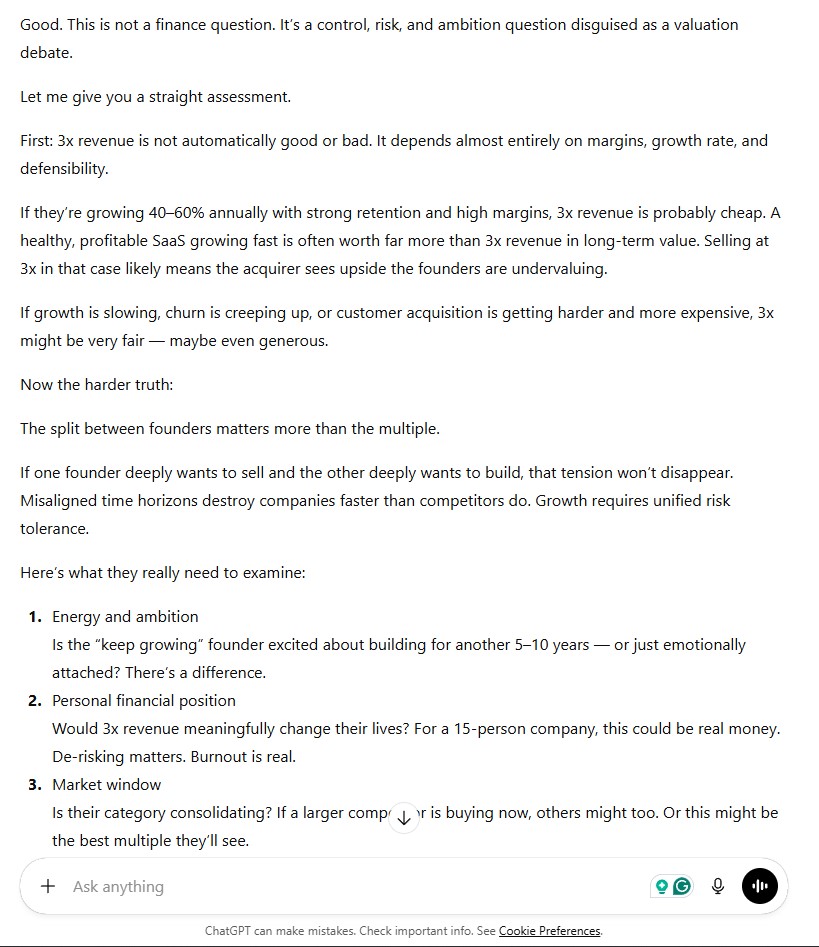
ChatGPT reframed the question as one of control, risk, and ambition, then built a five-point numbered framework covering energy, financial position, market window, concentration risk, and post-acquisition reality. The analysis is sharp and each point is well-reasoned.
But the numbered list is exactly what the prompt asked it to avoid. ChatGPT defaults to structured frameworks even when explicitly told not to. That is a strength if you want scannable output and a limitation if you want someone to think with you rather than organize for you. View the full ChatGPT response.
Claude (Opus 4.6)
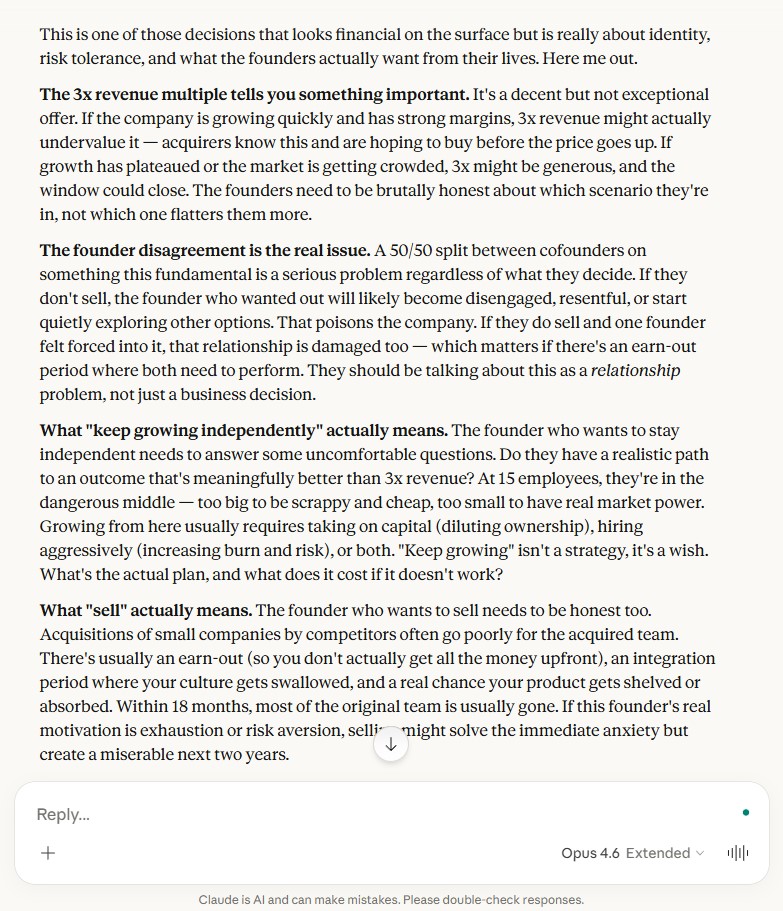
Claude opened by reframing the decision as one about identity rather than money. No numbered list. It works through the 3x multiple, the founder disagreement, and the reality of both options as connected arguments rather than separate categories. It names the founder split as a relationship problem, not just a business one, and raises a path most people overlook: one founder buying the other out.
The analysis reads less like a framework and more like advice from someone who has thought about this specific situation before. View the full Claude response.
Both models gave substantive, useful answers you could act on. The difference is in how they organize thinking. ChatGPT structures for clarity. Claude reasons through narrative. This pattern held across every test we ran and matches what the Reasoning section below covers in more detail.
Writing Style Test
The prompt asked both models to explain why people underestimate creative project timelines, written as if talking to a smart friend over coffee. Not a blog post, not an article, just a natural explanation. About 150 words.
The prompt: “Explain why most people underestimate how long creative projects take. Write this as if you’re explaining it to a smart friend over coffee — not as a blog post, not as an article, just a natural explanation. About 150 words.”
ChatGPT (GPT-5.2)
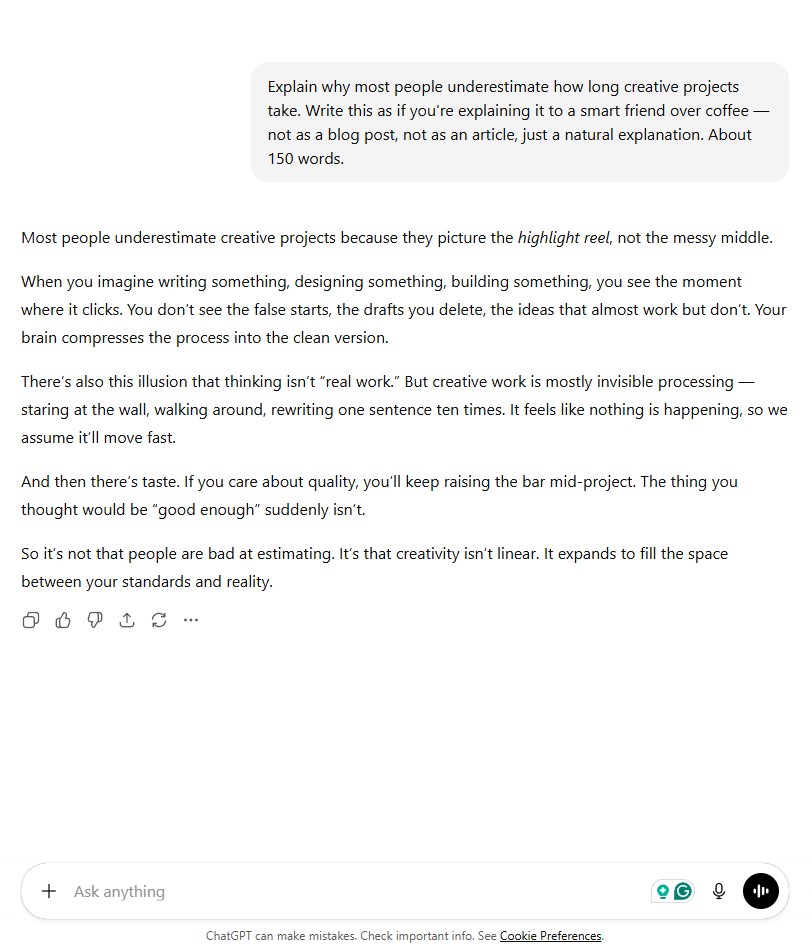
ChatGPT produced a clear, well-organized explanation with a thesis in the opening sentence and distinct supporting points in each paragraph. The writing is strong. But read it again and notice the structure: topic sentence, elaboration, transition, topic sentence, elaboration, conclusion.
That is a blog post format, which is exactly what the prompt said not to write. ChatGPT struggled to fully escape its default content style even when explicitly told to. View the full ChatGPT response.
Claude (Opus 4.6)
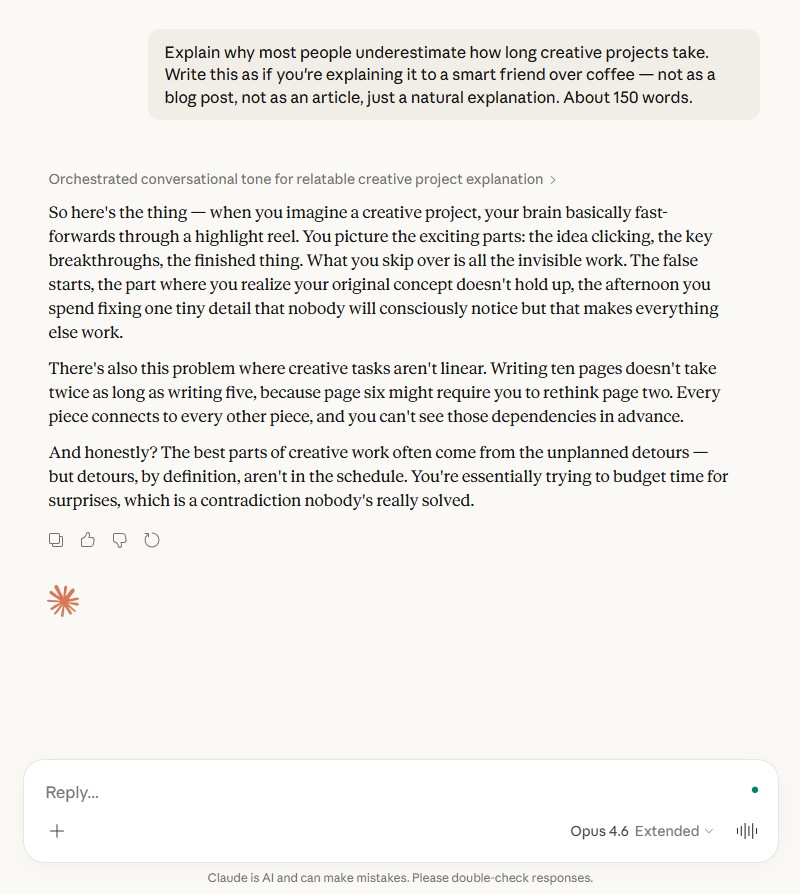
Claude opened with “So here’s the thing —” and stayed in conversational mode throughout. The sentences vary in length and rhythm. It uses dashes and asides the way people actually talk. The closing line lands like someone wrapping up a thought, not concluding an essay. This is the output that sounds least like AI wrote it. If the article’s claim is that Claude writes like a knowledgeable colleague, this test is the proof. View the full Claude response.
The writing style test directly validates what the Writing Quality section describes. ChatGPT defaults to structured content even when asked not to. Claude adapts to the requested voice more naturally. For tasks where tone matters as much as information, this difference is significant.
ChatGPT Overview
ChatGPT is built on OpenAI’s GPT-5 model family, released in August 2025. The flagship GPT-5.2, released in December 2025, handles coding, agentic tasks, and complex reasoning. A lighter GPT-5 nano variant offers strong general performance at a fraction of the cost.
OpenAI has built ChatGPT into a broad ecosystem. It includes DALL-E for image generation, Advanced Voice for spoken conversations, web browsing, and over 60 app integrations. The GPT Store lets users create and share custom GPT configurations.
ChatGPT’s free tier provides limited GPT-5.2 access with rate limits. An $8/month Go tier (may include ads) adds more messages and longer memory.
The $20/month Plus plan opens GPT-5.2 Instant and Thinking modes, Codex, and all premium features. A $200/month Pro tier adds unlimited usage and priority access.
GPT-5.2 brought a major jump in coding and tool-use ability compared to earlier models. It handles multi-step tasks more reliably and follows complex instructions with less drift.
Claude Overview
Claude is built by Anthropic, a company focused on AI safety research. The latest Claude Opus 4.6, released in February 2026, represents Anthropic’s most capable model. It features a 1 million token context window in beta, letting it process entire books or large codebases in a single conversation.
Claude’s design prioritizes careful, accurate responses. It tends to acknowledge uncertainty rather than guess, which makes it popular for research and analysis tasks.
Anthropic’s approach to safety training gives Claude a distinct personality, one that many users describe as thoughtful and direct. The free tier provides limited Sonnet and Haiku access, while Claude Pro at $17/month (annual) or $20/month (monthly) opens all models including Opus. Max plans at $100 or $200/month add significantly more usage, and Claude Code provides a command-line coding tool.
Writing Quality
Writing is one of the most common reasons people use AI assistants. Both ChatGPT and Claude produce competent text, but their styles differ noticeably.
ChatGPT tends to produce structured, organized writing with clear headers and formatted sections. It follows instructions about tone and format reliably. For marketing copy, social media posts, and formulaic content, it works well.
The output can feel polished but sometimes generic, especially at default settings. Adjusting the system prompt and temperature settings helps, but ChatGPT’s default voice leans toward a professional, somewhat corporate tone.
Claude tends toward more natural, flowing prose. Its writing often reads closer to how a person would actually explain something. For long-form writing tasks like essays, reports, and detailed explanations, Claude generally produces text that needs less editing.
The difference comes down to this: ChatGPT writes like a skilled content producer, Claude writes like a knowledgeable colleague. Neither is universally better. Your preference depends on the type of writing you need.
For email drafting and short business writing, both perform similarly. Creative writing and nuanced arguments give Claude a slight edge in our writing comparison tests, which include side-by-side output samples. For structured output with specific formatting requirements, ChatGPT tends to be more consistent.
Both models improve significantly with good prompt design. Specifying tone, audience, and format in your prompt narrows the quality gap between them considerably.
Reasoning and Analysis
Complex reasoning tasks reveal meaningful differences between these models.
ChatGPT’s GPT-5.2 excels at multi-step problem solving. It handles logic puzzles, mathematical reasoning, and structured analysis with strong accuracy. GPT-5.2’s Thinking mode adds explicit step-by-step reasoning for hard problems, available on Plus and Pro plans.
Claude Opus 4.6 brings strong analytical capabilities with a focus on careful, grounded responses. Anthropic reports significant benchmark improvements over its predecessor, including gains on reasoning-heavy evaluations like ARC-AGI-2. Claude’s adaptive thinking feature lets it adjust reasoning depth to match problem complexity before responding, similar to OpenAI’s approach.
For data analysis, both models perform well. ChatGPT integrates with its Code Interpreter tool for running Python code directly, which gives it a practical edge for number-crunching.
Claude handles qualitative analysis and document review particularly well, partly because its larger context window lets it process more text at once. Feed Claude a 50-page report and ask for a summary with key contradictions, and it handles the full document without chunking. ChatGPT can do the same within its 400K limit, but Claude’s additional headroom matters for truly large inputs.
Where Claude often stands out is in nuance. When a question has genuine ambiguity or multiple valid perspectives, Claude tends to acknowledge that complexity rather than flattening it into a single answer. For research tasks requiring balanced analysis, this matters.
The reasoning test above demonstrates this directly. ChatGPT organized the same problem into a numbered framework. Claude wrote a connected argument that weighed factors against each other. Neither approach is wrong, but they serve different thinking styles.
Coding Ability
Both models are capable code assistants, but they shine in different scenarios.
ChatGPT with GPT-5.2 is widely regarded as one of the strongest coding models available. It handles code generation, debugging, refactoring, and explaining code across most popular languages.
The Code Interpreter feature lets ChatGPT execute Python code in the conversation, test outputs, and iterate. This makes it particularly effective for data science and quick prototyping.
OpenAI also offers dedicated Codex models for specialized coding tasks. The latest GPT-5.3-Codex powers a separate coding agent with its own credits-based pricing system. By contrast, Claude Code runs on the standard Opus 4.6 model bundled with your subscription.
Claude approaches coding with strong architectural understanding. It explains design decisions well and writes clean, well-commented code.
Claude Code, Anthropic’s command-line tool, gives developers an agent that can work directly in their terminal and codebase. Claude’s large context window allows it to review entire repositories, which helps with understanding large projects.
On the ecosystem side, OpenAI’s models power GitHub Copilot, which provides inline code suggestions across popular editors. Anthropic does not have an equivalent IDE integration at the same scale, though Claude Code offers a terminal-based alternative. Developers who rely on Copilot-style autocomplete may find ChatGPT’s ecosystem more familiar.
For everyday coding tasks, the practical difference is small. Both generate working code for standard problems.
ChatGPT has a slight edge in quick code execution and iterative debugging thanks to Code Interpreter. Claude has an advantage when working with large codebases that need to fit in context.
For beginners learning to code, both explain concepts well. ChatGPT’s ability to run code inline makes it slightly more convenient for testing and learning. Claude’s detailed code comments help beginners understand why each line exists, not just what it does.
Context Window Comparison
The context window determines how much text a model can process in a single conversation. This is where ChatGPT and Claude differ most dramatically.
ChatGPT’s GPT-5 family offers a 400,000 token context window. That is roughly 300,000 words, or about 600 pages of text. For most tasks, this is more than enough.
Claude Opus 4.6 pushes this to 750,000 words in a single conversation. That 1 million token beta limit allows Claude to process entire books, large legal documents, or full codebases without splitting them into chunks.
For typical conversations and short documents, the difference is irrelevant. Both models handle standard tasks comfortably within their limits.
The gap matters for genuinely large inputs. Analyzing a 200-page contract, reviewing a full semester of lecture notes, or processing a large codebase all benefit from Claude’s extra headroom. These workflows push past what smaller context windows can handle comfortably.
Claude Sonnet 4.6 and Haiku 4.5 offer 200,000 token windows at lower price points, still larger than most competitors but below the Opus tier. On the OpenAI side, GPT-5 nano offers the same 400K window as GPT-5 at a fraction of the cost, which makes large-context work more affordable.
Pricing Comparison
Cost varies significantly depending on how you access these models. Check OpenAI’s consumer pricing and Claude’s pricing page for the latest figures.
Subscription Plans
| Plan | ChatGPT | Claude |
|---|---|---|
| Free | GPT-5.2 (limited) | Sonnet + Haiku (limited) |
| Go | $8/mo (may include ads) | N/A |
| Standard paid | $20/mo (Plus) | $17/mo annual, $20/mo monthly (Pro) |
| Power user | $200/mo (Pro) | $100-200/mo (Max) |
| Business / Team | $25/user/mo annual, $30 monthly (Business) | $20/seat/mo annual, $25 monthly (Team) |
| Enterprise | Custom | Custom |
At the $20/month tier, both offer strong value. ChatGPT Plus gives access to GPT-5.2 Instant and Thinking modes, Codex, DALL-E, and Advanced Voice. Claude Pro opens all model tiers including Opus 4.6.
OpenAI also offers a Go plan at $8/month that sits between the free tier and Plus. It includes GPT-5.2 Instant access and may show occasional ads. There is no equivalent budget tier on the Claude side.
API Pricing
| Model | Input (per 1M tokens) | Output (per 1M tokens) |
|---|---|---|
| GPT-5 | $1.25 | $10.00 |
| GPT-5.2 | $1.75 | $14.00 |
| GPT-5 nano | $0.05 | $0.40 |
| Claude Opus 4.6 | $5.00 | $25.00 |
| Claude Sonnet 4.6 | $3.00 | $15.00 |
| Claude Haiku 4.5 | $1.00 | $5.00 |
For API users, ChatGPT’s flagship GPT-5.2 is still cheaper than Claude Opus 4.6. GPT-5.2 costs $1.75 per million input tokens versus Claude Opus at $5.00.
The gap narrows when comparing mid-tier models. Claude Sonnet 4.6 at $3.00 input competes with GPT-5.2 at $1.75.
One pricing detail worth noting: Claude Opus 4.6 charges premium rates for prompts over 200K tokens ($10 input / $37.50 output per 1M). If you plan to use Claude’s full 1M context regularly, factor this higher tier into your cost estimates.
Understanding how LLM pricing works helps you estimate real costs. A typical 1,000-word conversation uses roughly 2,000-3,000 tokens total.
At casual usage levels, cost differences are minimal. The gap between free and paid LLM plans grows most noticeably at the API tier, where high-volume use amplifies even small per-token differences.
User Experience
Beyond raw capabilities, the day-to-day experience of using each tool differs.
ChatGPT offers a mature, feature-rich interface. You get image generation, voice conversations, file uploads, web browsing, and the GPT Store for custom assistants.
The mobile app is polished and supports voice mode for hands-free conversations. Plugins and integrations connect ChatGPT to hundreds of third-party tools, making it a hub for many workflows.
Claude provides a cleaner, more focused interface. Projects let you organize conversations with uploaded documents and custom instructions. Artifacts display code, documents, and interactive content in a side panel.
The experience is simpler but well-designed for work sessions. Claude’s mobile app covers core features, though it does not match ChatGPT’s voice mode capabilities.
ChatGPT’s breadth of features makes it feel like an all-in-one platform. Claude feels more like a focused work tool built for depth over breadth. Which you prefer depends on whether you want a Swiss Army knife or a sharp specialist.
For team use, pricing starts at $25/user/month for ChatGPT Business or $20/seat/month for Claude Team on annual billing. ChatGPT Business integrates with Microsoft’s ecosystem and supports shared custom GPTs. Claude Team adds shared Projects and centralized billing, which suits teams doing collaborative research or writing.
For crafting effective prompts, both models respond well to clear instructions. ChatGPT handles system-level prompts and custom GPT configurations. Claude’s Projects feature achieves similar customization through persistent context documents.
Both models can produce hallucinated content, meaning confidently stated information that turns out to be wrong. Claude tends to flag uncertainty more explicitly, while ChatGPT may present uncertain information with more confidence. Neither eliminates this risk entirely.
When to Choose ChatGPT
Choose ChatGPT when you need: multimodal input (image, audio, video), cheap API pricing, in-conversation code execution, or a large plugin ecosystem.
ChatGPT fits best when you work across multiple content types. If you need to generate images, transcribe audio, and write text in the same session, ChatGPT handles all of this natively.
Its broad feature set supports diverse use cases in one tool. Marketers, content creators, and generalists who jump between tasks throughout the day often find ChatGPT’s all-in-one approach saves time.
For developers, GPT-5.2’s combination of strong coding ability and lower API costs makes it compelling. The Code Interpreter feature eliminates the need to switch between ChatGPT and a separate development environment for quick tasks.
Teams already using Microsoft products benefit from ChatGPT’s Copilot integrations, which embed GPT models across Word, Excel, and other Office tools. If your organization runs on Microsoft 365, this integration alone can justify the choice.
Freelancers and solo professionals who need one tool for everything tend to get the most value from ChatGPT. Social media managers, startup founders, and small business owners often appreciate having image generation, writing, and analysis in a single subscription.
When to Choose Claude
Choose Claude when you need: the largest context window, natural-sounding writing, careful analysis that flags nuance, or a focused project workspace.
Claude fits best when your work involves long documents or complex analysis. If you regularly process legal contracts, research papers, or full codebases, Claude’s 1M token context window handles inputs that would require chunking in ChatGPT.
For writing-intensive work, Claude’s prose style typically requires less editing. Writers, researchers, and analysts often prefer Claude’s tendency to produce measured, well-structured text.
Lawyers reviewing long contracts, academics synthesizing research papers, and consultants drafting detailed reports find Claude’s combination of long context and natural prose especially useful. Summarizing a 100-page filing that might take an hour of manual reading can be done in a single Claude prompt in under a minute. If your work revolves around reading and writing long documents, Claude’s strengths align closely with those needs.
Claude’s Projects feature makes it effective for ongoing work where you need the model to maintain context across sessions. You can upload reference documents, set custom instructions, and keep organized workspaces using the Claude interface.
Gemini also offers a 1M token window, so Claude is not the only large-context option. The ChatGPT versus Gemini matchup puts two differently priced models side by side for those still weighing alternatives.
The Bottom Line
ChatGPT and Claude are both strong AI assistants that keep getting better. ChatGPT offers broader features, cheaper API pricing, and stronger multimodal support. Claude offers a larger context window, more natural writing, and a focused work experience.
The best choice depends on your specific needs. If you primarily write and analyze long documents, Claude is likely the better fit. If you need an all-purpose AI tool with image generation, voice, and the widest integration ecosystem, ChatGPT makes more sense.
For many users, the honest answer is that either model works well for most tasks. The differences matter most at the edges: very long documents, very high API volume, very specific writing styles, or very particular feature requirements. Starting with the free tier of each is the most practical way to find which model fits your workflow.
Frequently Asked Questions


