

The difference between a useful LLM response and a frustrating one often comes down to how you ask. A vague prompt returns vague output. A specific, well-structured prompt returns something you can actually use.
This gap matters more than most people realize. Learning how to use LLMs is now a mainstream skill. The ability to communicate clearly with these models separates people who get real value from those who give up in frustration.
Whether you are drafting emails, analyzing data, or brainstorming ideas, prompt quality shapes output quality.
The good news: writing effective prompts is not a mysterious talent. It follows a small set of principles that anyone can learn and apply immediately.
Key Takeaways
What Makes a Prompt Effective
Prompt: The text input you give to a large language model. A prompt can be a question, an instruction, a block of context, or a combination of all three. The model generates its response based entirely on what the prompt contains.
An effective prompt gives the model enough information to produce a relevant, accurate, and well-formatted response. Think of it like giving directions. “Go somewhere nice for lunch” is less helpful than “find a quiet Italian restaurant within a 10-minute walk that serves lunch under $20.”
Large language models predict the most likely next words based on the input they receive. They do not read your mind or infer your unstated preferences. Every detail you leave out of a prompt is a detail the model must guess, and guessing is where most bad outputs come from.
This is why the same model can produce brilliant results for one person and disappointing results for another. The model did not change. The prompt did.
OpenAI’s prompt engineering guide describes this as giving the model “sufficient context” to produce useful answers.
The Core Principles
Effective prompts share a few consistent traits. They are specific about the desired outcome and include relevant context. The expected format is also described, along with boundaries that keep the model focused.
These are not rigid rules to memorize. They are patterns that naturally produce better results across any model, whether you are using ChatGPT, Claude, or Gemini. According to Anthropic’s prompt engineering documentation, giving the model clear and direct instructions is the single most effective technique for improving output quality.
Specificity Changes Everything
Vague prompts produce generic responses because the model has too many possible directions to choose from. Adding specifics narrows the field and points the output toward what you actually need.
Specificity means stating the topic, the audience, the scope, the tone, and the outcome. You do not need all five in every prompt. But the more specific your prompt, the less editing you will need after the response arrives.
Here is what that looks like in practice. “Write about marketing” could go in a thousand directions.
“Write a 300-word overview of email marketing strategies for small e-commerce businesses launching their first campaign” narrows the topic, length, audience, and scenario. The model produces a focused response because the boundaries are clear.
This same principle applies to every type of task. A research question benefits from specifying the time period and sources.
A coding request benefits from naming the language and framework. An editing request benefits from describing the target audience and style.
Context Shapes the Response
Models lack the background knowledge you carry in your head. A prompt that makes perfect sense to you may be ambiguous to the model because it cannot see your full situation.
Adding context means telling the model who the audience is, what has already happened, what constraints exist, or what background information is relevant. This is especially important for tasks like editing, analysis, and creative work where the “right” answer depends on circumstances.
For example, asking a model to “fix this paragraph” will produce a generic rewrite. Adding context like “this is for a medical journal audience, keep technical terminology, and tighten the prose without changing the meaning” produces a targeted edit. The model can only match your expectations when it knows what those expectations are.
Format Instructions Remove Guesswork
One of the most common sources of disappointment is receiving a response in the wrong format. You wanted bullet points and got paragraphs. A table would have helped, but the model returned a wall of text instead.
Three sentences were the goal, but ten arrived.
Telling the model what format to use takes seconds and eliminates the most common reason people re-prompt. You can specify lists, tables, numbered steps, Q&A format, JSON, or plain paragraphs. You can request a specific word count, sentence count, or section structure.
Format instructions also include tone and style. “Explain like I am a beginner” produces different language than “write for a technical audience.”
Both are valid. The model just needs to know which one you want.
Examples Give the Model a Target
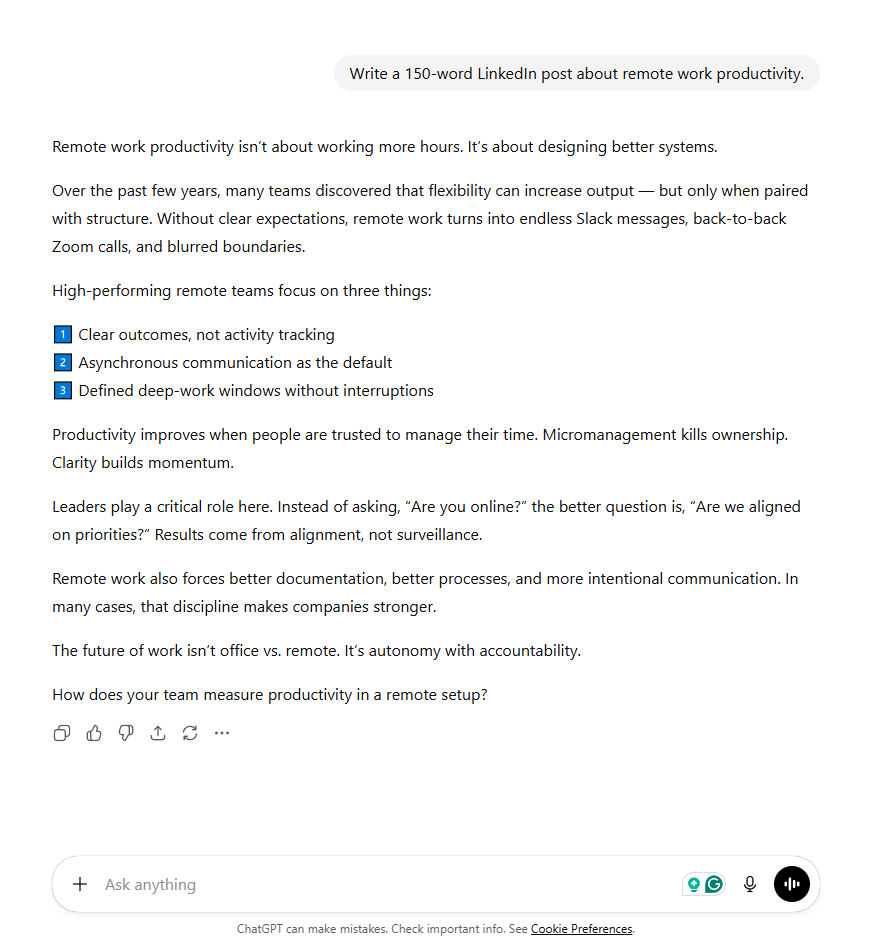
When you need output that matches a specific style or structure, showing the model an example is more effective than describing it in words. This technique is called few-shot prompting, and it works because the model can pattern-match against concrete samples.
The difference is visible in practice. The first image below shows a simple prompt asking for a LinkedIn post about remote work productivity. The output is competent but generic, with a numbered list and a standard closing question.
The second image shows the same request, but this time the prompt includes a short writing sample and asks the model to match its tone and style. The output shifts noticeably, adopting shorter sentences, a more direct voice, and the opinionated rhythm of the example.
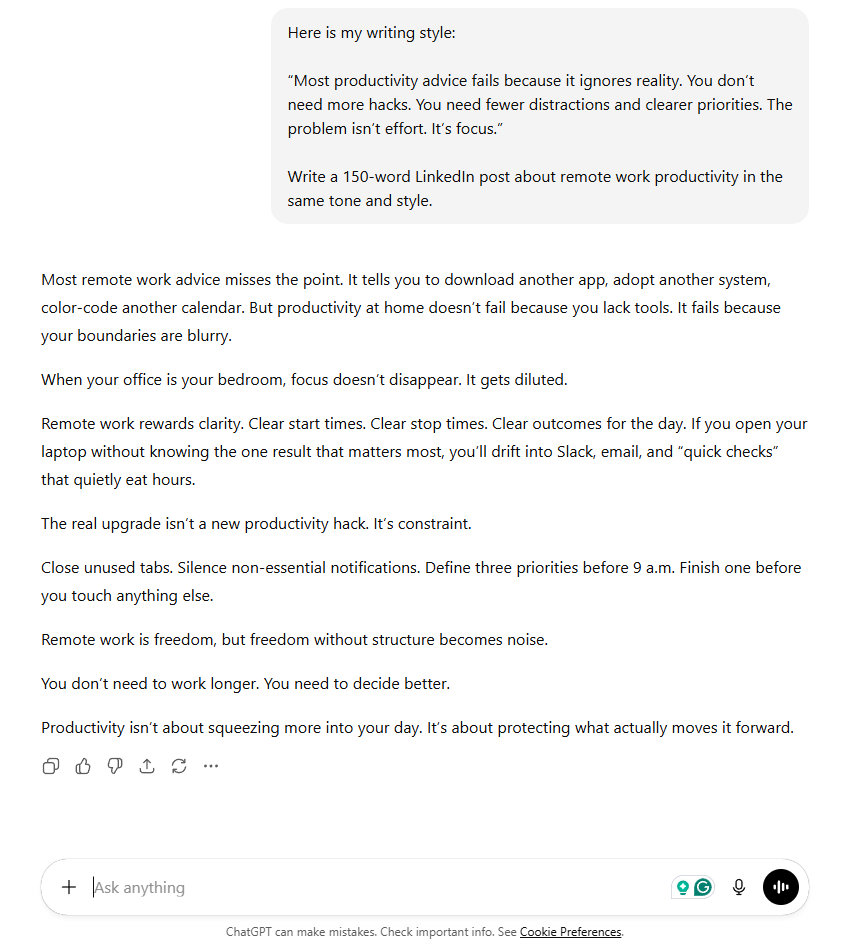
The prompt barely changed in length. But the addition of a concrete example gave the model a target to aim for, which reshaped the entire response. Google’s Gemini documentation describes examples as one of the most reliable ways to shape model output.
Examples work best when they are short and representative. One or two good samples communicate more than a long description of what you want. Even a single example can shift output quality more than five extra sentences of instruction.
Iteration Is Part of the Process
Many people treat their first prompt as if it should produce a perfect result. In practice, the first response is a starting point. Refining your prompt based on what the model returns is normal and expected.
Iteration can mean adjusting the level of detail, changing the format, or adding a constraint you forgot. It can also mean asking the model to revise its own output. “Make this more concise” or “remove the jargon” are valid follow-up instructions that build on the initial response rather than starting over.
How Prompt Quality Shows Up in Practice
The impact of prompt quality becomes visible in the first few words of a response. A weak prompt produces output that wanders, includes unnecessary preamble, or misses the point entirely. A strong prompt produces output that starts on topic and stays there.
Before-and-After: Vague vs. Specific
The first prompt could return anything from a 2,000-word essay on AI history to a list of startups. The second prompt tells the model exactly what to cover, how much to write, and what to exclude. Specific prompts save time because you skip the back-and-forth of clarifying what you wanted.
Before-and-After: Missing vs. Included Context
Without context, the model invents details. It might assume a formal tone when you want a casual one. It might write 400 words when you need brevity.
Context lets the model generate a response that fits your real situation instead of a generic template.
Start with the simplest prompt that could work, then add detail if the output misses the mark. This approach is faster than writing a long prompt upfront, and it helps you learn which details actually matter for each type of task.
Observable Patterns in Output Quality
People who write effective prompts share a few habits. They spend a moment thinking about what they actually want before typing.
They include details that seem obvious. And they treat the first response as a draft to refine rather than a final answer.
People who struggle with LLMs tend to write the way they would speak to a colleague who shares their context. That approach works in conversation because colleagues fill in the gaps from shared experience.
LLMs cannot do this. They respond to exactly what they see in the prompt. This is why the context window and what you put inside it matters so much in practice.
Key Elements of an Effective Prompt
The table below breaks down the components that make prompts work. Not every prompt needs every element, but most effective prompts include at least three or four of these.
| Element | What It Does | Example |
|---|---|---|
| Task | States what the model should do | “Summarize,” “Compare,” “Draft,” “Explain” |
| Topic | Defines the subject matter | “email marketing for e-commerce” |
| Audience | Sets the knowledge level and tone | “for a non-technical CEO” |
| Format | Describes the expected output structure | “as a numbered list with 5 items” |
| Length | Constrains the response size | “in 200 words or less” |
| Constraints | Adds boundaries or exclusions | “do not include pricing details” |
| Context | Provides background the model needs | “this is for a job application in finance” |
| Tone | Sets the voice and style | “professional but approachable” |
| Examples | Shows what good output looks like | “similar to this: [example]” |
The first four elements, task, topic, audience, and format, cover the majority of situations. Adding length and constraints prevents the most common output problems. Context, tone, and examples become important for specialized or nuanced work.
Complex tasks benefit from including more elements in your prompt than simple ones. A quick factual question needs only a task and topic. A long-form writing task benefits from all nine.

Strengths and Limitations of Better Prompts
When Better Prompts Help
Improved prompts produce noticeably better results for writing tasks, brainstorming, data formatting, and structured analysis. These are tasks where the model has strong capabilities but needs clear direction to apply them well.
Better prompts also reduce the number of follow-up messages needed. One well-crafted prompt often replaces a chain of three or four vague ones, saving time and tokens in the process. Research from Microsoft on prompt engineering strategies shows that structured prompts consistently outperform unstructured ones across a range of tasks.
The improvement is most dramatic for tasks with clearly defined outputs like summaries, translations, and data extraction. When the model knows exactly what format to produce, prompt quality directly determines whether the output is usable on the first try.
When Better Prompts Are Not Enough
No prompt can fix a fundamental model limitation. If a model generates incorrect facts, a better prompt can reduce the frequency but not eliminate it entirely. Models still fabricate citations, confuse similar concepts, and struggle with precise math.
Better prompts also cannot compensate for tasks that exceed the model’s training. Asking for real-time data, access to private databases, or domain expertise the model was not trained on will produce poor results regardless of prompt quality. Knowing when to use an LLM matters as much as knowing how to prompt one.
Always verify factual claims in LLM outputs, especially numbers, dates, and citations. Even a perfectly written prompt cannot guarantee factual accuracy. The model generates plausible text, not verified truth.
The relationship between prompt quality and output quality is strong but not linear. A prompt that is twice as long does not always produce twice as good a response. There is a point of diminishing returns where additional instructions start to conflict or confuse the model, something LLM settings like temperature can amplify.
Common Misunderstandings About Prompting
“Longer Prompts Are Always Better”
More detail helps up to a point. Beyond that point, extra instructions can introduce contradictions or shift the model’s focus away from the main task.
The goal is completeness, not length. A focused 40-word prompt often outperforms a rambling 200-word one.
This is a common trap for people learning prompt engineering. They assume that if some detail is good, more detail must be better. In practice, the best prompts are as short as they can be while including everything the model needs.
“You Need Special Tricks or Secret Phrases”
Some popular advice suggests using magic words like “think step by step” or “you are an expert.” These techniques can help in specific situations. But they are not universal fixes. Zero-shot and few-shot prompting strategies work because they give the model useful structure, not because the words themselves are special.
The underlying principle is always the same: give the model clear information about what you want. If “think step by step” helps, it is because it encourages the model to show its reasoning, which catches errors earlier. The clarity is what matters, not the specific phrasing.
“Once You Find a Good Prompt, It Works Forever”
LLM providers update their models regularly. A prompt that worked well with one model version may need adjustments when the provider releases an update. Prompts are tools that need occasional maintenance, not permanent solutions.
This also applies across models. A prompt optimized for one platform may not transfer perfectly to another. Using LLMs effectively means understanding that different models interpret instructions in slightly different ways.
“The Model Should Understand What I Mean”
This is the most common misunderstanding. People assume the model can infer intent from brief or ambiguous prompts the way a human colleague would. It cannot.
Models respond to the literal content of the prompt, not to your unstated expectations.
If you find yourself frequently disappointed by LLM outputs, the issue is almost always in the prompt rather than the model. This is worth remembering because it means the fix is within your control. Better input produces better output every time, which is the most practical skill anyone using LLMs for writing can develop.
“You Need to Be an Expert to Write Good Prompts”
Effective prompting does not require technical knowledge. It requires clear thinking about what you want and the willingness to include that information in your request.
The people who write the best prompts are often not engineers. They are clear communicators who treat the model like a capable but literal assistant.
Choosing the right model matters, but clear prompting matters more. A well-prompted small model frequently outperforms a poorly-prompted large model, which is why this skill pays off regardless of which LLM you use.
Conclusion
Prompt quality is the factor most within your control when working with LLMs. The model, its training data, and its capabilities are fixed for any given conversation. What you write in the input box is not.
The principles are straightforward: be specific, provide context, request a format, and set constraints. These four habits cover the vast majority of situations and work across every major model. Applying them consistently is what separates people who find LLMs useful from those who find them unreliable.
Better prompts are not about perfection. They are about giving the model enough information to do its job.
Start with your next prompt, apply one or two of these principles, and notice the difference. As you build this habit, choosing the right model for your task and writing more productive prompts become natural next steps.
Frequently Asked Questions


